

1.6 Saves Time in More Ways Than Just Adding a New Interface
If your biggest concern right now is where to farm weapon matrices, the key is not to blindly spend all your Sanity items. First determine the target stats, then use the new Version 1.6 progression overview to identify gaps, and finally focus on farming the corresponding progression materials. Stat selection for signature weapons and Battle Pass weapons should also be based on the character's actual needs. Do not lock in your resources just because you see a rare affix.
The main focus of the Version 1.6 improvements is really about filling in several of the most frustrating gaps at once: you no longer need to flip back and forth between character pages to check materials, you do not need to watch a progress bar during equipment crafting, you can quickly switch loadouts when multiple operators share equipment, and you no longer have to return to the warehouse just because you are missing a field device. Veteran players know how valuable these changes are. The numbers may not have inflated directly, but the time saved every day is genuinely significant!!
How Should You Choose Weapon Matrices? Check the Main Stat First, Then Consider Cold Damage
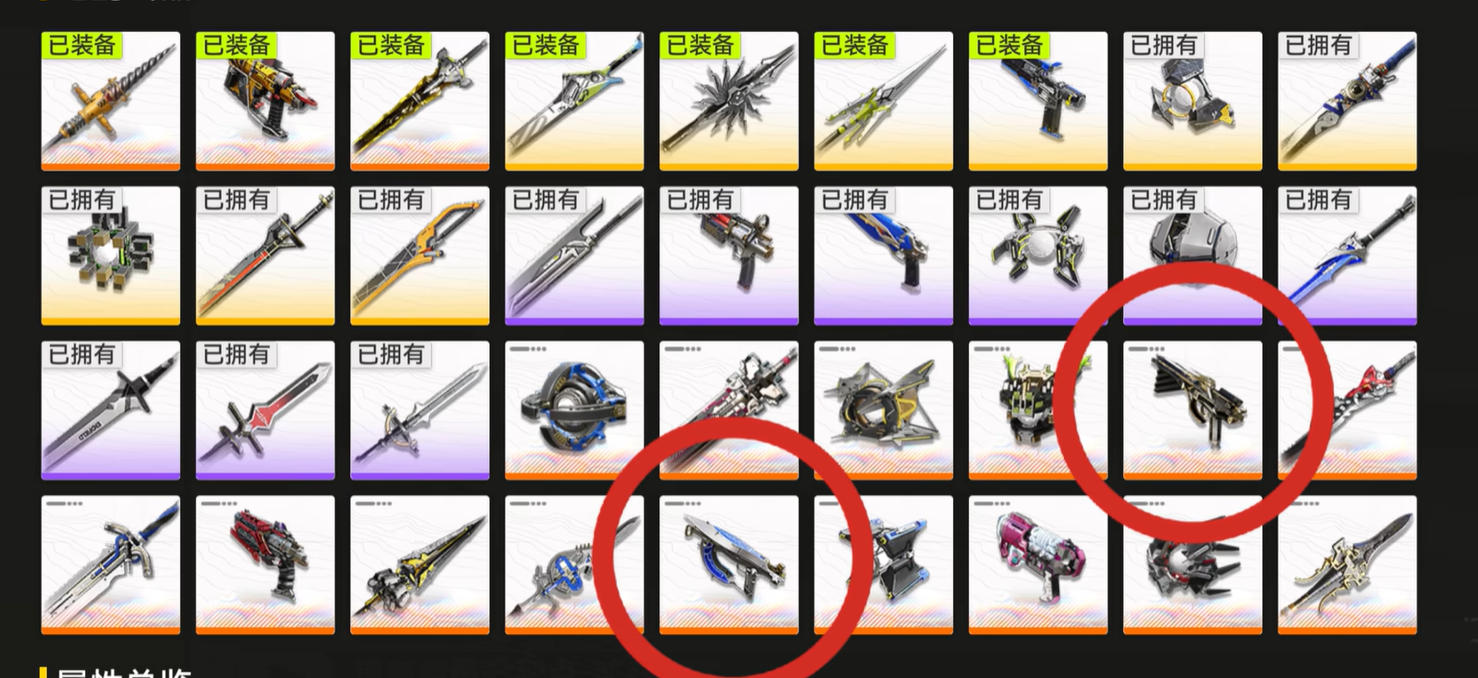
The approach that can currently be confirmed is that the stat selection for the relevant signature weapons and Battle Pass weapons centers on the Intelligence direction. If a character's damage output or skill benefits depend on Cold damage, Agility can be prioritized as the main stat, with increased Cold damage selected as the third additional stat.
Keep in mind that stat priority cannot be discussed separately from the character. Agility, Intelligence, and increased Cold damage provide different benefits, and the final choice still depends on the character's skills, team rotation, and available equipment slots. When materials are limited, prioritize the main stat and key affixes. There is no need to empty all your Sanity items at once just to chase a weapon matrix that looks “perfect.”
Some players have mentioned farming continuously for two days and nearly exhausting their Sanity items without getting the desired result; others obtained their target shortly afterward and happened to have enough previously saved fodder to complete the upgrade. Both experiences point to the same issue: farming results are random, and one player's consecutive drops cannot be used to infer a fixed probability. Until the drop rate is confirmed, the safest approach is to set a resource limit, prioritize your main damage dealers, and then decide whether to continue pursuing secondary stats.
If your only goal is to make a character viable for deployment, producing a usable matrix is often more worthwhile than being stuck for a long time chasing perfect endgame affixes. This is especially true if you are preparing multiple operators, since resource allocation affects overall progress more than the absolute best affixes on a single weapon.
Progression Overview: Check Your Gaps Before Farming Materials
Version 1.6 provides a more intuitive progression overview. Open the character interface, click the progression overview in the upper-right corner, and select the relevant operator to view the required materials for their level, skills and talents, and weapon level, along with your current inventory.
This feature is best suited to solving two problems. First, you may be preparing to focus on one character but not know which materials are still missing. Second, you may be halfway through farming weapon materials only to discover that the real bottleneck is skill or talent materials. You can now review the target character from start to finish before arranging your Sanity expenditure, reducing situations where you farmed a large amount today only to discover tomorrow that you were going in the wrong direction.
For players with limited resources, it is recommended to check the major categories—character level, skills and talents, and weapon level—before deciding whether to pursue additional matrix affixes. Until basic progression is complete, the marginal benefit of equipment usually is not worth occupying your Sanity for a long time. Once your main team is established, it becomes more appropriate to invest resources in finer stat optimization.
What Changed in the Equipment Crafting Interface? Queues, Quantities, and Refinement Are Easier to Manage
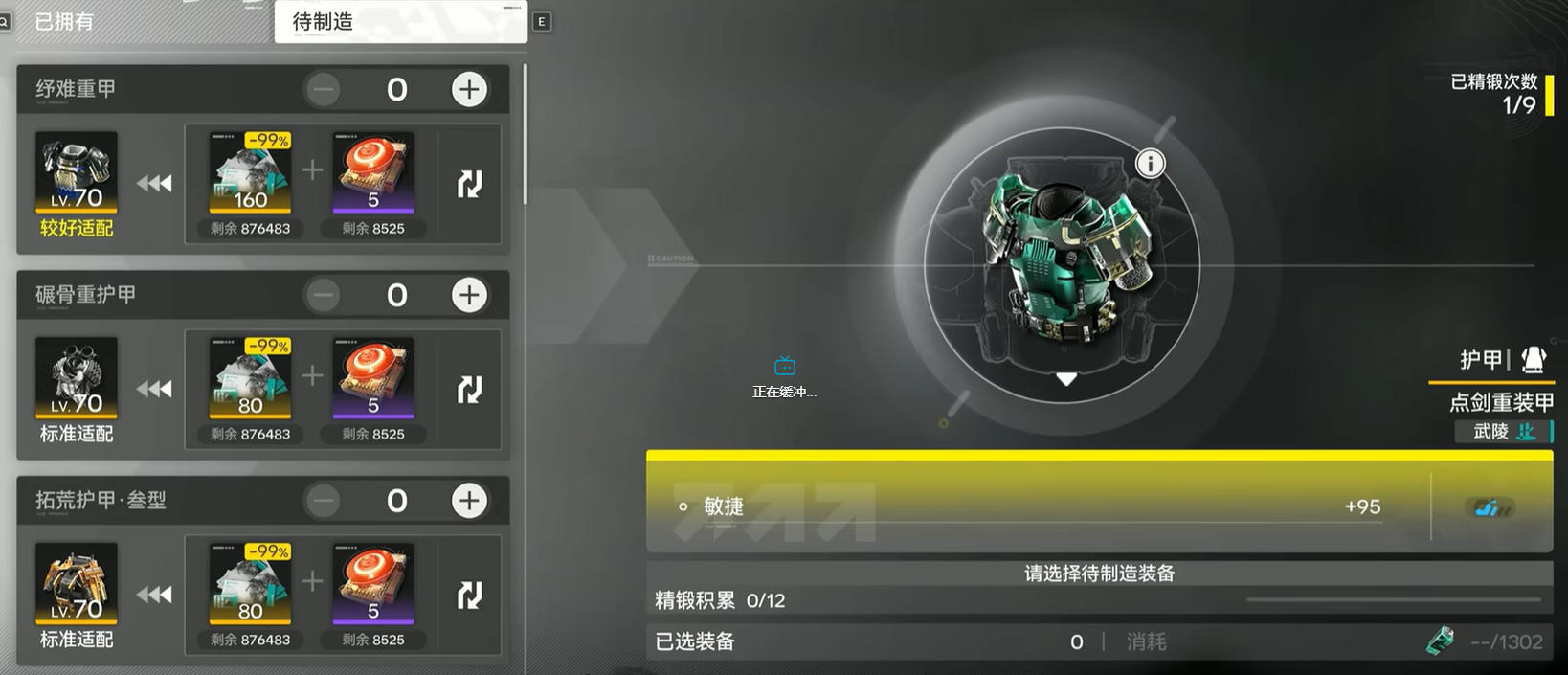
The Version 1.6 equipment crafting interface adds a pending crafting section. High-quality equipment that can currently be crafted is placed at the top by default, and players can directly adjust the crafting quantity. Once crafting is complete, planned equipment can be processed all at once. After completing refinement in advance, excess equipment will no longer continue to be crafted.
This change addresses the combined problems of inventory management and the crafting process. In the past, the most common situation was crafting a large amount of temporarily useless equipment while trying to produce a batch of target gear, only to return later and find the entire screen filled with low-value equipment. You can now set the quantity first and craft according to your needs, greatly reducing both resource and inventory pressure.
However, “automatic queuing” does not mean you can stockpile equipment without thinking. The amount you craft should still be determined by your current team and future progression plans. It is fine to prepare extra copies of commonly used equipment, but do not fully max out equipment that clearly serves only one stage. Players who are still testing team compositions should reserve materials for key characters and avoid emptying their inventory simply because the crafting interface is convenient.
It Is Worth Using Loadouts Early: Switching Between Healing and Clearing Builds Becomes Much Easier
The loadout feature lets you save different equipment combinations and quickly switch between saved setups later. A practical use is to save a healing-focused equipment setup separately from one intended for long-term stage farming and clearing, so you do not have to manually remove and reinstall equipment every time a character's role changes.
This feature becomes even more valuable when multiple operators share a set of high-quality equipment. Refine your commonly used gear first, then save combinations suited to different characters or combat scenarios. In practice, this is much easier than repeatedly searching through your inventory.
There is also a limit to keep in mind: switching loadouts only reduces the operational cost; it cannot create additional equipment. If multiple teams need to deploy at the same time, you still need to check whether your inventory is large enough. Early on, it is not recommended to craft large quantities of equipment just to fill every loadout. Prioritize creating core sets that can cover your main team.
Call Warehouse Devices Directly in the Field to Reduce Trips During Gathering and Construction
Version 1.6 also allows players to use devices from the warehouse directly in the field, such as Relays, Power Supplies, and Mining Machines. As long as the corresponding device is already in the warehouse, it can be called directly from the relevant interface. If it is not in the warehouse but you have enough materials, it can also be crafted from that interface.
This change is very helpful for players who frequently travel across the map, build facilities, or gather resources. Previously, running out of a device often meant leaving the current area and returning to retrieve or craft one, abruptly interrupting the process. Now you can handle it directly in the field, making the overall flow much smoother.
Keep in mind that being able to craft something directly does not mean its material cost has been removed. You should still check your basic material reserves before heading out, especially when mining, supplying power, or developing an area continuously. The point of this convenience feature is to reduce backtracking, not to replace resource planning.
Expiring Sanity Items: Automatic Conversion Does Not Mean the Maximum Sanity Storage Has Officially Increased

Version 1.6 adds a feature related to the automatic use of expiring Sanity items. Once an item expires, it will automatically be converted into Sanity. If the conversion causes your Sanity to exceed the current maximum, the excess will also be injected into an unoccupied Sanity Extractor.
This is a genuine burden reduction for players who stockpile items. At the very least, you no longer need to worry about forgetting to deal with items shortly before they expire, nor do you have to disrupt your farming plans at the last minute to avoid waste. The ability to send Sanity above the cap into an unoccupied Sanity Extractor also gives excess resources another destination.
However, you cannot conclude solely from the fact that overflow enters the extractor that the maximum Sanity storage limit has increased. For now, the safer interpretation is that Version 1.6 has optimized how expiring items are converted and how overflow is handled. The exact storage capacity and how the extractor calculates the amount should still be determined by the actual in-game rules. Therefore, check whether the Sanity Extractor has an available slot before an item expires, and do not completely ignore your inventory status just because the automatic feature exists.
Combo Skill Priority Can Be Adjusted, Making Combat Rotations Easier to Execute as Planned
Version 1.6 also adds the ability to adjust Combo Skill activation priorities. For teams that rely on a fixed rotation, this option can reduce situations where skill activation order differs from expectations, making combat feel smoother.
When adjusting priorities, start with the team's core rotation rather than simply placing every powerful skill at the top. If Combo Skills have dependencies or sequencing between them, priority should serve the team's energy, buffs, and damage windows. If the team places more emphasis on survival, you can move key defensive or recovery-related activations earlier.
This feature is more of a tool for “reducing mistakes.” It will not directly turn an incomplete team into a high-performance composition. Character investment, weapon stats, and skill levels are still the foundation; priority settings simply help an established team execute its plan more consistently.
Version 1.6 Resource Planning: Do Not Use the Same Farming Approach at Every Stage
When you first begin building a character, use the progression overview to confirm the materials required for levels, skills, talents, and weapons. First fill in the basic resources needed for the character to function properly. For weapon matrices, prioritize the main stat and key direction first; there is no need to chase perfect secondary stats immediately.
Once your team is stable, consider optimizing loadouts and exclusive matrices. At this point, you can turn commonly used equipment into fixed loadouts to reduce the operating cost of switching between multiple operators. For characters with a clear need for Cold damage, you can then farm toward increased Cold damage as the third additional stat.
Players with larger resource reserves can use the automatic handling feature for expiring Sanity items to arrange long-term farming, but you should still set a stopping point. Failing to obtain a target drop after farming for two consecutive days does not mean the next attempt is guaranteed. Before investing further, confirm whether the equipment will genuinely improve your team's performance. This is more rational than being led by the thought, “I've already farmed for this long, so I might as well farm a little more until it is complete.”
KARDZ Top-Up Guide: Consider Safety and Convenience Before Choosing a Channel
If you are preparing to purchase a monthly pass, replenish progression resources, or plan future pulls, choosing a top-up channel is equally important. Safety, convenience, and reliable delivery are often more worth prioritizing than a channel that merely looks slightly cheaper in the short term. This is especially true for players planning to play long term; using unknown sources is not recommended.
Kardz supports direct top-ups through a UID, so you do not need to give your account password to anyone, making the process relatively straightforward. It also provides 24/7 service, which makes it more convenient to handle order or delivery issues promptly. Players with a fixed budget can plan a monthly top-up amount in advance and add funds according to their needs. Do not temporarily exceed your budget just because one farming session did not go well.
The most important part of Version 1.6 is not any one isolated new feature, but the way it makes daily processes involving weapon matrices, material checks, equipment crafting, loadout switching, field devices, and Sanity items work together more smoothly. Check your target stats before farming matrices, identify gaps before investing in progression, control quantities when crafting equipment, and confirm the status of overflow devices for expiring items. Arranging things this way can greatly reduce wasted resources.
As for weapon affixes, something usable, strong enough, and suited to your team is often more important than blindly pursuing theoretical perfection. Version 1.6 has reduced the operational cost; the remaining step is to make trade-offs based on your own roster and budget. What do you most want to optimize first: weapon matrices, equipment loadouts, or Sanity items? This version really does feel like “veteran players finally do not have to suffer anymore”!!